You can send details to a MOS-based NRCS as MOS objects.
For all template details as MOS objects in the NRCS, see section Mosart Templates Feedback to the NRCS.
Managing Destinations
Active Destinations
The list of channels contains the active destinations is configured in the Overlay Graphics Interface (OGI). Active destinations are destinations linked to a graphic engine.
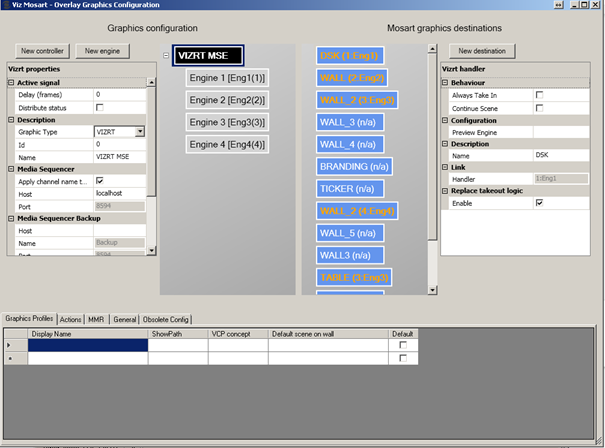
In the configurations above, the following engine-destination mapping is performed:
Destination | Engine number |
|---|---|
DSK | 1 |
WALL | 2 |
WALL_2 | 3 |
WALL_2 | 4 |
TABLE | 3 |
MOS Format
The list of channels in the LOWERTHIRDS MOS object will be:
<keys name="channels"><k>WALL_2</k><k>WALL</k><k>TABLE</k><k>DSK</k></keys>
The active channels from Overlay Graphics are sent to the NRCS only if the Overlay Graphics Interface is started.
This is the recommended workflow to correctly send the channels configured in Overlay Graphics Interface to NRCS.
To send configured OGI channels to the NRCS
The steps in square brackets are optional.
Start Manus Administrator
Start Overlay Graphics Interface (OGI)
[Perform any required configuration changes in OGI > Settings]
[Restart OGI or do Ctrl+Shift+G if configurations are changed]
[Verify that %localappdata%\Temp\Mosart Medialab\MOS State\ MosTemplateCache.xml contains expected data]
Execute mosReqObjList or mosReqAll from the NRCS
Detailed Description of MOS Objects
See the Appendix for code-level descriptions of Structure of the MOS object with Lowerthird Information.