
The Particle System plug-in simulates and renders complex visual effects and natural phenomena (for example, fire, smoke, rain, snow, fog, dust, and explosions).
The Viz Engine Render Pipeline supports GPU-accelerated particle systems.
Supported Pipelines | |
|---|---|
Classic Render Pipeline |
|
Viz Engine Render Pipeline |
|


Note: The Classic Render Pipeline particle modifiers like Vortex or Turbulence are not supported.
This page contains information on the following topics:
Particle System Properties
Common Properties
Sort Particles: Sorts the particles from back to front to produce correct alpha blending.
Pause Simulation: Pauses/resumes the simulation.
Reference: Changes the way the container transformation is applied to the particle system.
Local: Applies the transformation to all particles.
World: Applies the transformation to the emitter.
Billboard: Controls the rotation of each particle in relation to the camera.
None: No change is done to each particle rotation.
Particle: Rotates each particle to face the camera.
Reset Simulation: Resets the particles and restarts the simulation.
Note: The sorting of particles should always be turned on when alpha images are in use to guarantee a correct blending.
Emission
Burst Mode: Emits particles in the same instant (instead of being continuously emitted) when toggled on.
Particle Limit: Limits the number of particles being simulated.
Emission Rate: Controls the amount of particles emitted per second. Fractional values can be used.
Lifetime: Determines the time (in seconds) for the particles to be simulated.
Lifetime Spread: Controls the randomness for the life time of each particle. A random value between -Lifetime spread and Lifetime spread, is added to the life time of each particle.
Random Seed: Sets the seed for the random number generator used by the random properties.
Emitter Space: Controls from where in the emitter the particles are emitted.
Surface: Emits the particles from the surface of the emitter volume.
All: Emits the particles from all the emitter volume.
Emitter Type: Selects the volume from which the particles are emitted. Dimensions for each type available can be changed using:
Sphere
Radius is the sphere radius.
Azimuth range is the opening angle on the XZ plane, in degrees.
Polar range is the opening angle from the Y axis, in degrees.
Cube
Cube Dimension X, Y, Z is the cube size on each axis.
Face
Face Dimension X, Z is the face (plane) size on each axis.
Force
Start Speed: Sets the initial speed for each particle.
Start Speed Spread: Controls the randomness for the start speed of each particle. A random value between -Start speed spread and Start speed spread, is added to the start speed of each particle.
Start Rotation X: Sets the initial speed rotation around the X axis.
Start Rotation Z: Sets the initial speed rotation around the Z axis.
Gravity: Controls the acceleration for the particles in the Y direction.
Air Resistance: Sets the scale of a drag force proportional to the particle speed.
Wind Force: Sets the magnitude of a force applied to each particle.
Wind Rotation X, Wind Rotation Z: Determines the direction of the wind force on the X and Z axis.
Turbulence X,Y,Z: Controls the scale of a random perturbation, of the speed of each particle on each axis.
Rotation Speed (Z axis): Sets particle angular velocity around the Z axis.
Rotation Speed Spread (Z axis): Controls the randomness for the particle rotation speed (Z axis) of each particle. A random value between -Particle rotation speed spread (Z axis) and Particle rotation speed spread (Z axis), is added to the particle rotation speed (Z axis).
Depending on their emitter type, particles behave differently:
Particles born in a cube move in six different directions.
Sphere particles spread from a single point or sphere surface.
Particles on a plane travel in only one direction.
Texture
Texture: Selects a texture to apply to each particle.
sRGB: Treats the texture as an sRGB encoded texture (checked by default) when checked.
Pre-Multiply Alpha: Multiplies the final color of the rendered particles with the alpha from the texture.
Horizontal Texture Tiles: Sets the number of horizontal tiles in the texture. Used to control the sprite sheet animation.
Vertical Texture Tiles: Sets the number of vertical tiles in the texture. Used to control the sprite sheet animation.
Linear Tile Animation: Calculates the texture tile selected for rendering by linearly interpolating within the horizontal and vertical tiles using the current life time of the particle when checked. Uncheck to control the tile selection using an animation curve.
Tile Number: Controls the tile number during its lifetime. Horizontal axis is the lifetime in seconds, vertical axis controls the tile number based on the percentage of total tiles.
Size
Size Scale X,Y: Scales for the size of the particle, where a particle is represented by a rectangle.
Size Spread X,Y: Controls the randomness for the size scale of each particle. A random value between -Size Spread X,Y and Size Spread X,Y is added to the size scale.
Size X, Y: Controls the particle size during its lifetime. Horizontal axis is the lifetime in seconds, vertical axis controls the particle size based on a percentage of the size scale.
Color
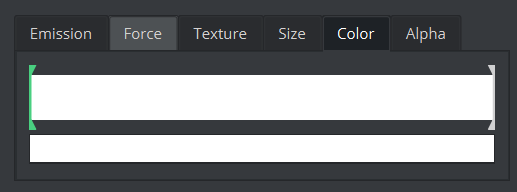
Use the color ramp box to control the particle color during its lifetime. The leftmost part of the ramp is the initial color and the rightmost is the final color. Multiple color handles can be created and moved. Change the color of each color handle in the smaller box below the color ramp.
Alpha
Alpha: Controls the particle alpha during its lifetime. Horizontal axis is the lifetime in seconds, vertical axis controls the alpha value.