
The Transition Logic engine for Viz. Creates two A/B placeholder containers with cross-fade directors, enabling animated switching between loaded graphics with object caching.
Note: This plug-in is located in: Plugins -> Container plug-ins -> Container
This page contains the following topics and procedures:
- Overview
- Prerequisites
- Description and Methodological Considerations
Overview
Toggle is the runtime engine behind Transition Logic. When added to a container, it:
Creates two placeholder subtrees (A-side and B-side) as children.
Generates cross-fade directors (AX/BX) with a default 1-second alpha dissolve.
Generates object directors (AO/BO) where loaded scene animations are placed.
Loads graphics onto the invisible placeholder, then switches with an animated transition — the viewer never sees a loading state.
Caches loaded objects for instant re-use.
Key concept — $current and $other The visible placeholder is always named $current; the invisible one is $other. On switch, the names swap. Content is loaded onto $other, data is pushed via ControlObject, then switch triggers the cross-fade.
Prerequisites
Give the container a unique, descriptive name (for example,
BannerLyr) — this becomes the Toggle layer name and director name.The container must have no existing children — Toggle creates its own.
Create a Director with the same name as the container.
The Director must have at least two stop points:
$O(Out, at frame 0) and at least one visible state (for example,$IN).Add Toggle to the container.
Click Default Keyframes to generate the GOTO_TRIO action channels.
Description and Methodological Considerations
Toggle plug-in is one of the main building blocks of Transition Logic, and it is in general a relatively simple plug-in. When the Toggle plug-in is added to a container, it creates two child containers that act as placeholder containers for objects that can toggle on and off screen. In addition, it also creates some utility directors in the stage.
Toggle Placeholder Containers
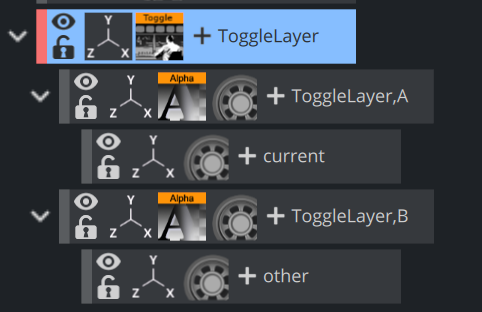
The two placeholder containers correspond to an A-side and a B-side. Each of the placeholders again have a child container; one named current the other named other. The current is typically the visible container, while the other is not visible. At the time of a switch, these containers switch names. This means that at any given time it is not possible to know if the current parent is the A side or the B side. It is the responsibility of the Toggle plug-in to keep track of this.
Toggle Directors and Key Frames
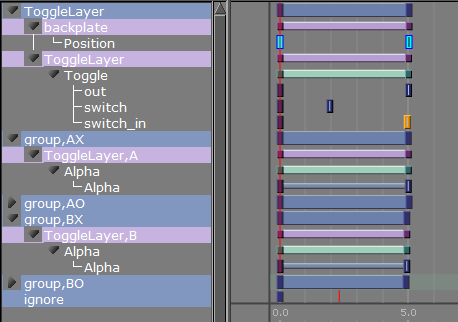
The Toggle plug-in creates two directors each containing a default one second cross fade animation. These animations are placed in the AX and BX directors. AX can be interpreted as the A-side cross fade. The animations can be modified to show any kind of transition, but it is important that the AX and BX are the same.
In addition to the cross fade directors the Toggle plug-in also creates placeholder directors for the object animations. Merged objects that are loaded into these placeholder containers during playback may contain animations embedded in the geometry object. The object animations are automatically added as a sub-director to the AO or BO director depending on if the object is being loaded on the A-side or B-side.
Caution: It is NOT recommended to manually adjust the AO and BO directors.
There are two different scenarios of when the utility directors are triggered:
When there is a state change. When there is a state change, the Toggle-Layer director is animated from the current state to the required next state. In this scenario, the utility directors are triggered according to the toggle Key Frames in the stage. This means that it is the position of these Key Frames that determine the timing of when the utility directors are triggered.
No state change, only changing the current object. When there is no state change, there is no movement of the Toggle-Layer director. In this case, the Toggle switch action is triggered, which animates the utility directors at the same time; animating the current object out and the next object in at the same time.
Note: Placeholder containers and directors are only generated if none exists from before.
Toggle has a built-in support for object loading. Enter the path to an object (for example, GEOM*myfolder/myobject) into the Object field, and the plug-in loads this object on the other container. The object is by default invisible and can be loaded with data, before activating the Switch action to show the object.
An object loaded this way is cached, so that requesting the same object again does not trigger loading again. The object cache can also be preloaded by specifying all the geometries that should be preloaded before initializing the Toggle plug-in. Preloading of the objects needed by the Toggle plug-in is done when a playlist is initialized. For this reason the Preload Object text field should normally not be manually modified in Viz Artist.
Director Naming Convention
For a Toggle container named BannerLyr, the following sub-directors are created:
Director | Purpose | Editable? |
|---|---|---|
| Controlling director — contains GOTO_TRIO action channels ( | Stop points only |
| A-side cross-fade — default: alpha 0→100 over 1 second. Customise for slides, wipes, 3D flips. | Yes — but must match BX |
| B-side cross-fade — must always be identical to AX. | Yes — must mirror AX |
| A-side object animation — auto-managed. Loaded scene animations become sub-directors here. | No — auto-managed |
| B-side object animation — auto-managed. | No — auto-managed |
AX and BX must always be identical: Toggle may load content on either side. If the cross-fade animations differ, transitions will look inconsistent depending on which placeholder is active.
Before adding the plug-in to a container in a scene, please make sure that:
You give the container a unique and sensible name. This name becomes the Toggle-Layer name. Also, as the Toggle plug-in automatically generates directors, which are named based on the container name and its parents names, it is worth considering if the location of the container that hosts the Toggle plug-in is in the correct position in the scene tree.
The container the Toggle plug-in is added to must not have any child containers.
A director with the same name as the container (Toggle-Layer name) is created.
The director has a minimum of two stop points and that these stop points are named correctly. The names must correspond with the Toggle-Layer states.
IMPORTANT! One of the Transition Logic requirements is to have a stop point named “O”. Best practice is to always name the first stop point “O” (frame 0).
After the Toggle plug-in has been added to the container, the plug-in icon can be clicked to see its properties. Clicking the Default Key Frames button creates the most commonly used Key Frames for triggering the toggling between the current and the other objects. Adjusting the timing can easily be done by moving the Key Frames in the stage.
A/B Switching Mechanism
Switch Operation
Animate out: Plays the X director of the current placeholder (fade out) in reverse.
Flip: Swaps which side is
$currentand which is$other.Rename: Renames containers are renamed so external TCP commands always address
$current/$otherconsistently.Animate in: Plays the X director of the new current placeholder (fade in).
Two Trigger Scenarios
Scenario | What happens |
|---|---|
State change (e.g. $O → $IN) | The layer Director animates via GOTO_TRIO. Toggle keyframes on the timeline trigger AX/BX at the designed moment. |
Object swap (same state, new content) | No Director movement. The |
Parameter Reference
Basic
Parameter | Default | Description |
|---|---|---|
Object | empty | Geometry pool path to load onto |
Manage stops | On | Rebuilds stop-points on loaded objects by calling ControlObject's |
Auto-continue other object on Switch | On | Automatically sends |
State control only | Off | Ignores all commands — only GOTO_TRIO state changes are processed. Optimisation for empty overlay scenes. |
Controls video | Off | Allocates/clears clip channels per placeholder for ControlVideo integration. |
Adaptive Scenes
Parameter | Default | Description |
|---|---|---|
Support Box Transformation | Off | Initialises Box Transformation on Toggle and placeholder containers. Subscene mode only. |
Support Flexbox layouting | Off | Creates Flexbox plugins on placeholders; uses |
Format Name | empty | Forces subscenes to render in a specific format. If empty, the master scene format is used. |
Advanced
Revealed when Show advanced is enabled.
Parameter | Default | Description |
|---|---|---|
Preload objects | template | List of geometry pool paths to preload (one per line, |
Director Command | empty | Raw director command string to execute on current/other object director. |
Object director preview position | empty | Symbolic name or timecode for the |
Dummy | 100 | Internal parameter used to anchor the controlling director's animation channel. Do not modify. |
Actions
Action | Description |
|---|---|
Switch | Full A/B cross-fade transition: animate out current → swap → animate in new current. |
Out | Animate out the current placeholder (reverse-play X director). |
In | Animate in the current placeholder (forward-play X director). |
Switch in | Swap other→current and animate in (no out animation on old). |
Switch in preview | Hide current without animation, swap, seek to preview position. |
Switch without animation | Swap visible containers instantly — no AX/BX playback. |
Continue | Send |
Continue Noanim | Seek object director to next stop without animation. |
Default Keyframes | Generate GOTO_TRIO action channels ( |
Delete Default Keyframes | Remove auto-generated keyframes. Run before re-generating after adding new stop points. |
Initialize | Clear object cache and reload everything in the preload list. |
Run director command on other | Execute the Director Command string against |
Run director command on current | Execute the Director Command string against |
Position object director at preview location | Seek the current object director to the timecode in Object director preview position. |
Move object director to next stop | Seek the current object director to the next stop point. |
Delete containers of all cached objects | Re-initialise placeholders and clear all cached containers from the tree. |
Delete containers of inactive objects | Delete cached containers that aren't currently active on either A or B. |
Default Keyframes
When Default Keyframes is invoked:
Scans the controlling director (same name as the Toggle container) for all stop points.
Creates three action channels on that director:
switch_in,out, andswitch.For each transition between stop points, inserts direction keyframes (±0.02s from boundaries) that tell AX/BX which way to play: forward (fade in) or reverse (fade out).
Creates the four sub-directors (
,AX,,BX,,AO,,BO) with default one second alpha animations.
This is what enables GOTO_TRIO to automatically trigger the correct transition when jumping between states.
Object Caching
Toggle caches every loaded object. Requesting the same scene path again returns the cached version instantly — no Graphic Hub load occurs. The cache can be:
Pre-populated: List paths in the Preload objects text area and invoke Initialize.
Built on demand: Each first load is cached automatically.
Cleared: Use Delete containers of all cached objects or Delete containers of inactive objects.
Custom Transitions
Replace the default AX/BX alpha dissolve with any animation style:
Slide: Animates position X/Y instead of opacity.
Scale: Scales current to 0, scale other from 0 to 1.
3D flip: Rotates containers on the Y-axis.
Wipe: Animates crop or stencil masks.
Dissolve with blur: Combines opacity with a blur plug-in.
The only constraint: AX and BX must always be identical animations.
Interaction with ControlObject
Interaction | Description |
|---|---|
Stop-point management | Before loading, calls |
Continue filtering | Before sending |
Video channel allocation | When Controls video is on, sends the allocated clip channel number to ControlObject. |
Subscene root discovery | Locates the ControlObject plugin on the loaded scene's root to determine the subscene boundary. |
Example: Master Scene with Two Layers
Scene "MasterScene" │ ├─ Container "BannerLyr" ← Toggle plugin │ ├─ Director "BannerLyr" ← stops: $O (frame 0), $IN (frame 50) │ ├─ Director "BannerLyr,AX" ← alpha 0→100 cross-fade │ ├─ Director "BannerLyr,BX" ← identical to AX │ ├─ Director "BannerLyr,AO" ← auto-managed │ ├─ Director "BannerLyr,BO" ← auto-managed │ ├─ $current │ │ └─ $object (loaded scene A) │ └─ $other │ └─ $object (loaded scene B) │ └─ Container "TickerLyr" ← Toggle plugin ├─ Director "TickerLyr" ← stops: $O, $TICKER ├─ ...AX, BX, AO, BO ├─ $current └─ $otherTypical Broadcast Workflow
Load: Set
Toggle*objectto a GEOM path → scene loads onto$other.Data: Push field values to
$other$object*ControlObject*in.Take: Layer director executes
GOTO_TRIO $O $IN→ default keyframes triggerswitch_in→ Toggle cross-fades from nothing to the new graphic.Update: Push new data to
$current$object*ControlObject*in(no animation needed).Swap: Load a different template onto
$other, push data, thenswitch→ A/B cross-fade.Out: Layer director executes
GOTO_TRIO $IN $O→ default keyframes triggerout→ current fades away.
Technical Notes
The container must have a unique name before adding the Toggle plug-in. Director names are derived from the container's tree path.
Toggle only generates placeholders and directors if none exist from before.
After changing Support Box Transformation or Support Flexbox, the scene must be saved and reloaded to regenerate the Toggle structure.
In subscene mode, after
SHOW $IN+switch INVOKE, acontinue INVOKEmust follow to complete the animation.sitch_no_animis an intentional internal name (not a typo in this documentation).Box Transformation / adaptive scenes are supported in subscene mode only, not with merged geometries.
See Also
Transition Logic section of the Viz Artist User Guide.