This section details how to create, assign and work with Web Channel media assets.

Render Layers
Web Channels allow a designer to use up to eight HTML-based render layers. They can be used either as Texture or as DVE effect.
Note: Web Channels are only available in Viz Engine Render Pipeline.
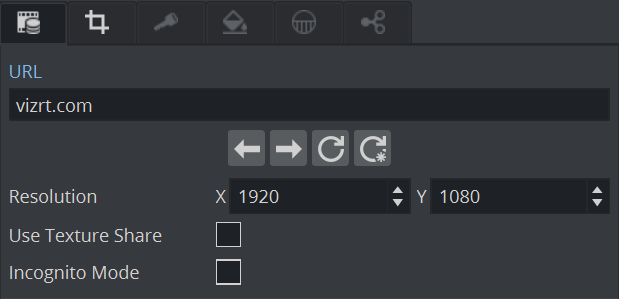
The navigation keys can be used to navigate within the Web Channel history. The shown Web Channel page can be refreshed by commands or buttons in the User Interface, If you want to do a “hard” reload, use the Ignore Cache reload function.
On single GPU instances, you can turn on Use Texture Share to directly access the texture of the Web Channel. If you want to start your browsing session in a clean environment, use Incognito Mode.
Requirements
Web Channels only require a valid URL. Once entered, the webpage is rendered and can be interactively used in DVE mode.
Note: The rendering of web content is synchronized with Viz Engine output refresh rate.
Information: Keyboard/mouse interaction is supported only in DVE mode.
Blending
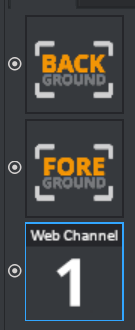
If you want to blend your webpage against any background in DVE mode, make sure your are using the following order:
Audio
Audio from Webpages is supported and mixed into Viz Engine Audio system. The Volume of Web Channels can be controlled in the Media Asset Transformation Tab.