To play out audio files, you use an audio player. An audio player (Mosart Audio Player) is already included with Viz Mosart.
Several third-party players are also supported.
This section highlights the Mosart Audio Player.
Working with the Mosart Audio Player
Info: The Mosart Audio Player replaces the discontinued Soundfile Player.
Getting Started
Info: Initial setup must first be performed by your system administrator as described in the Viz Mosart Administrator Guide, section AV Automation Device Properties.
This setup defines the Viz Mosart Audio player as default audio playout device and creates a Desktop shortcut.
Supported Formats
mp3, wav, wma, aac, m4a, mp4, aiff, avi.
Audio Player UI
To open the Audio Player
Click the Desktop icon

Info: If there is no icon, you can start the program fromC:\Program Files (x86)\Mosart Medialab\Mosart Audio Player\Mosart Audio Player.exe.
Otherwise see the Info above.
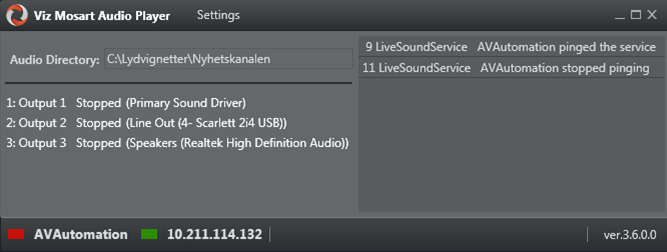
Audio Player Explained
Under standard operation, the audio player acts as a monitor and has no controllable features.
UI Element | Description |
|---|---|
Settings | Opens the Settings menu for advanced Audio Player configurations. |
Audio Directory | Folder path to your available audio files. All files in this folder are ready to be played. Only files located in this directory are available to the Viz Mosart audio player. |
Numbered Output list | A list of all available devices. |
Log panel (right hand panel) | All log messages that the audio player creates. |
AVAutomation (status) | Green: AV Automation is connected |
IP Address | IP address of the computer that the Audio Player is running on. |
Version | Version number of the Audio Player. |
Mosart Audio Player Settings
These advanced settings determine audio destinations and player characteristics.
For most users, they are filled-in by your system administrator and need not be changed.
For further details, refer to the the Viz Mosart Administrator Guide, section Audio under AV Automation Device Properties.
Working with Third Party Audio Players
In addition to the onboard player described above, Viz Mosart supports a variety of audio players including Vizrt’s TriCaster switcher.
For further details, refer to the the Viz Mosart Administrator Guide, section Audio under AV Automation Device Properties.