Script Units are reusable TypeScript modules that centralize logic and share it across multiple templates in Template Builder. Instead of duplicating utility functions or business rules in each template, you place them in a Script Unit and import them wherever needed.
Script Units are stored in Viz Pilot’s backend. This means they function as shared, centralized code:
When you create or update a Script Unit, the change is immediately available to all templates that import it.
Any template using that unit automatically picks up the new behavior as soon as the unit is saved, no redeployment of individual templates is required.
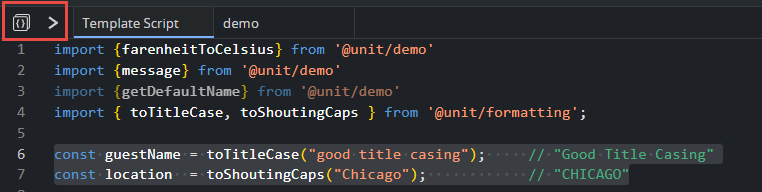
A Script Unit is imported and used in a template as follows:
import { toTitleCase, toShoutingCaps } from '@unit/formatting';const guestName = toTitleCase("good title casing"); // "Good Title Casing"const location = toShoutingCaps("Chicago"); // "CHICAGO"And the unit itself might look like:
// @unit/formattingexport function toTitleCase(name: string): string { return name .toLowerCase() .replace(/\b\w/g, c => c.toUpperCase());}export function toShoutingCaps(text: string): string { return text.trim().toUpperCase();}Script Units provide a clean way to maintain consistency, reduce duplication, and ensure that updates to shared logic propagate instantly across your entire template ecosystem.
Create, Modify and Delete Script Units
The Viz Pilot backend maintains a record of which templates depend on which Script Units. Therefore, it is important that the Script Unit list in Template Builder accurately reflects all units referenced in your template scripts.
To manage Script Units, click the Script Units icon to open the list:
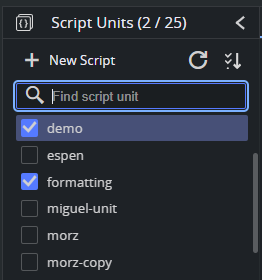
From the Script Units panel, you can:
Create a new Script Unit.
Search and sort existing units.
Attach a Script Unit to the current template by selecting the checkbox next to its name.
These operations ensure that your template always has access to the Script Units it requires, and that the backend can track dependencies correctly.