As debugging Transition Logic scenes is complex, Logicmaker comes with a health check feature. Click the i button in the bottom bar. The button spins while the checks run, then a checklist opens.
A passing check reads as a statement of what holds, with a green check mark; a failing check names the problem, has a warning sign and lists the affected layers or scenes.
Hover any line for an explanation of the check and the suggested fix. A scene without transition layers reports No transition logic loaded.
Example report:
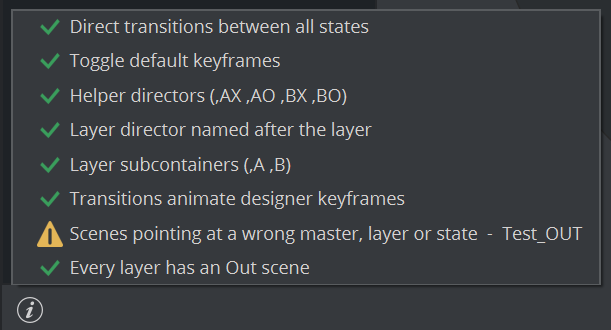
The report is a snapshot for the master that was loaded when you clicked the button; switching scenes while the checks run discards it.
Direct transitions between all states
Checks: on each layer's director the stop markers form transitions that connect every pair of states (for n states, n(n-1)/2 distinct pairs).
Why it matters: between two states without a direct transition the layer cannot animate; it can only cut.
Typical causes: the layer was built or edited by hand in the Stage (stop markers moved or deleted), or a state was added or removed outside the Logicmaker.
How to resolve:
Select the layer; its director appears in the Stage; inspect the stop markers.
For states you have not designed yet: remove the state in the Logicmaker and add it again; the Logicmaker creates all missing transitions (one second each).
For designed states: add the missing stretch in the Stage by placing the stop markers of the two states next to each other, then rebuild the Toggle keyframes (see 10.2).
Run the check again.
Toggle default keyframes
Checks: the Toggle's
outandswitch_inbutton channels exist and each holds exactly two keyframes per transition (2 x (number of stops - 1)).Why it matters: the Toggle uses these keyframes to switch between the two placeholders and to cross-fade during a take. Out of step with the stops, a take can show the wrong content or the wrong timing.
Typical causes: stops moved, added or deleted by hand in the Stage; the Toggle's keyframes edited by hand; a layer copied or imported from a package with a different structure.
How to resolve:
Use the Toggle plugin's Delete Keyframes and then Default Keyframes functions; they regenerate the standard pattern from the current stops. Or
change a transition's duration in the Logicmaker (for example 1.00 to 1.10 and back); the Logicmaker rebuilds the channels as part of the edit.
Good to know: the check measures deviation from the standard pattern. A layer with hand-made hold keyframes can take correctly and still be reported. The Logicmaker replaces the Toggle's keyframes with the standard pattern when you change a duration or remove a state, so hand-made ones would be lost then.
Helper directors (,AX ,AO ,BX ,BO)
Checks: a layer has either none of the four crossfade helper directors or all four. The report lists what is missing per layer, for example
Lower: missing ,AO ,BO.Not a problem: a layer without any helper directors is valid - fresh layers start that way, and removing a state clears helpers that become empty. Only a partial set is reported.
Other lines:
<layer>: missing transition director ...means the layer's director could not be found;<layer>: stage unavailablemeans the Stage could not be read (run the check again).Typical causes of a partial set: a helper deleted or renamed by hand, or a rename done outside the Logicmaker.
How to resolve:
Rename the layer in the Logicmaker to another name and back (choose Layer only in the dialog if you do not want the pages touched). All existing helpers are renamed consistently with the layer.
If helpers are still missing, delete the remaining helper directors of that layer in the Stage - a layer with none is valid - or recreate the layer.
Layer director named after the layer
Checks: the director that the Toggle's
outchannel animates is named exactly like the layer.Why it matters: control applications and the Logicmaker address the director by the layer's name; a different name breaks takes by name.
Typical causes: a layer container was copied (for example
LeftBartoLeftBarExt) and renamed in the Scene Tree, while its director kept the old name; or the container was renamed outside the Logicmaker.How to resolve:
In the Stage, rename the director to exactly the layer's name (and the helpers to
<name>,AXand so on), orrename the layer in the Logicmaker to another name and back; the container and all directors follow.
Layer subcontainers (,A ,B)
Checks: the layer container has the two placeholder subcontainers whose names end in
,Aand,Bdirectly below it (Lower,AandLower,B).Why it matters: the Toggle loads the content of a take into these containers; without them nothing can be shown.
Typical causes: a placeholder was deleted, renamed or moved in the Scene Tree.
How to resolve: recreate the missing placeholder as an empty child container of the layer container and name it
<Layer>,Aor<Layer>,B, then run the check again.
Transitions animate designer keyframes
Checks: for layers whose director animates designer properties (for example Position or Alpha), every transition contains at least one keyframe. A keyframe at the start of a transition counts for the previous one; one at its end counts for it. Layers whose director has no property channels at all (pure toggles) are skipped.
Why it matters: a transition without keyframes does not animate the layer: the content switches with no movement (a hard cut).
The report names the affected transitions as
Layer (from→to), for exampleLower (O→IN, IN→O).How to resolve: select the layer, find the listed transition between the two stop markers in the Stage and add keyframes. If the cut is intended, you can leave the finding.
Scene identifiers (background, layer, state)
Checks: every leaf scene in the folder with a ControlObject names this master in
background, an existing layer inlayerand one of that layer's states instate. Scenes that fail show a warning sign in the Scenes pane and are listed here.Why it matters: a page with wrong identifiers cannot be taken: the control application does not find its layer or state.
Typical causes:
a layer or state was renamed or removed without letting the scenes follow (answering Layer only or No);
the master was saved under another name, so every page still names the old master;
a page was copied from another package or edited by hand.
How to resolve:
Open the scene, select its
objectcontainer and correct the ControlObject entriesbackground,layerandstate, then save the scene. Ordelete the page and create it again with + in the Scenes pane.
Next time answer Yes / Layer and scenes in the rename dialogs so the pages follow.
Every layer has an Out scene
Checks: each layer has at least one leaf scene whose state is O.
Why it matters: without such a page operators cannot clear the layer from a control application.
How to resolve: click + in the Scenes pane, choose the layer and the state O and name it
<Layer>_OUT. Layers created with Create Out page ticked have one already. A layer that is meant to stay on air permanently can be left without one.
Merged geometries for all scenes (legacy workflow only)
Checks: only shown when
TransitionLogicUseMergedGeometriesis active: every leaf scene carries a merged geometry.How to resolve: click the listed scene once in the Scenes pane - taking it merges its geometry on demand - and run the check again, or move to the subscene workflow.
Which findings can I leave?
Finding | Can it be advisory? |
|---|---|
Helper directors: none present | Not reported at all; valid. |
Transitions without animation | Yes, if the hard cut is intended. |
Layers without an Out scene | Yes, for layers that stay on air permanently. |
Toggle keyframes out of step | Yes, if the layer takes correctly and you do not mind that Logicmaker edits normalize it. |
Directors not named after their layer | No: fix it, takes by name depend on it. |
Direct transitions between all states | No: some state changes cannot animate. |
Subcontainers (,A ,B) | No: nothing can be shown. |
Scene identifiers | No: those pages cannot be taken. |