Each layer row shows the layer name with its number of states in brackets, for example Lower (3), and a badge for every state: red for O, green for all others. The state the Logicmaker last took on that layer is filled solid.
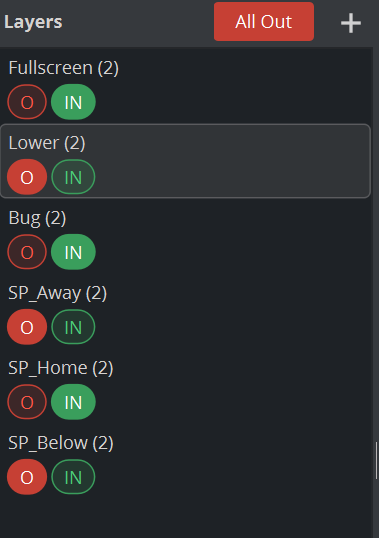
Action | How |
|---|---|
Select a layer | Click the row. The graph shows its states, its container is selected in Viz Artist and its director in the Stage. |
Take a state | Click a state badge. This also works on layers that are not selected. |
Jump to a state without animation | Shift+click the badge. |
Add a state | Hover the row and click the + at its right end. |
Rename the layer | Select it and press F2, or right-click and choose Rename. |
Delete the layer | Right-click and choose Delete, or press Delete. |
Add a layer | The + in the header, or right-click and choose Insert new Layer. |
Take all layers to Out | The red All Out button. |
Adding a layer

The + in the header slides in the New Layer form: a Name field (a free name such as NewLayer is proposed) and the check box Create Out page (ticked). Create is enabled when the name is valid and unique. Enter creates, Esc cancels. The new layer starts with O and IN and a one-second transition. With Create Out page ticked, a scene <Layer>_OUT is created as well.
Changes to layers and states modify the loaded master, so save the master in the Scene Editor.
Renaming a layer
Press F2, type the new name and press Enter. The Logicmaker renames the layer's container and its directors together and refreshes the Stage.
If leaf scenes refer to the layer, a dialog asks first if these scenes should also be changed or not. By default Layers and scenes will be changed.
Deleting a layer
After the confirmation Do you want to delete Layer: Lower? the layer's container, including everything inside it, and its transition directors are removed from the master.
Leaf scenes of that layer are not deleted; they show a warning sign until you delete or retarget them.
All Out

All Out takes every layer to its Out state.
Do this before you save the master: a master that is saved mid-animation shows content the moment it is loaded.