Configuration
To start working with Maps within Viz Artist, an account on Vizrt Maps Service is required. If you do not already have an account, please contact Vizrt Support.
They will provide you with an API endpoint and a unique Access token.
Open Viz Artist Configuration and browse to the Viz Maps section:
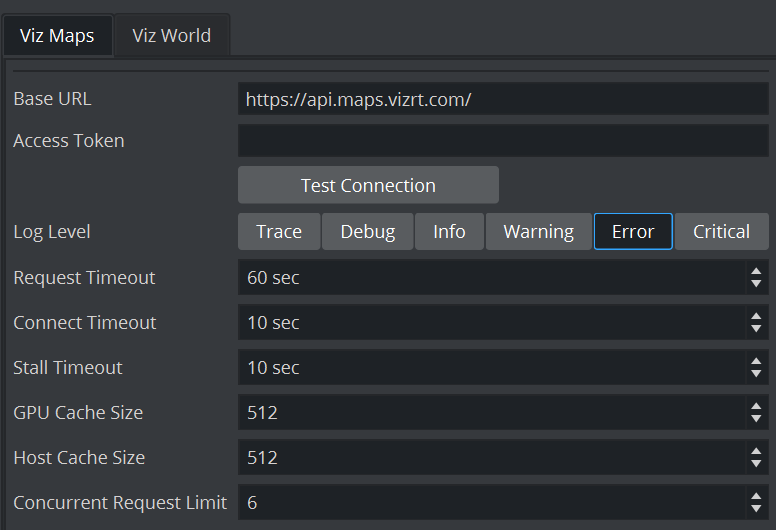
Put the data you’ve been provided by vizrt support into Base URL and Access Token.
You most probably won’t need to change the other settings.
Log level simply defines how detailed log messages of the Maps Subsystem will be logged.
GPU and Host Cache define limits of how much data is being stored on the Graphic Board and on internal RAM. Setting the to 0 disables any limit.
You can limit the maximum amount of parallel requests to limit the bandwidth request to the maps backend server.
Creating Styles
To start working with maps within Viz Artist, Styles need to be created within the Viz Maps Designer.

See Viz Maps Designer User Guide how to create map styles.
Attribution Settings
Attribution is displayed as part of the customer's licensing agreement. Customers licensed under the Attribution tier are required to display attribution, while Attribution-Free licenses remove this requirement.
Attributions can be set on a scene level.
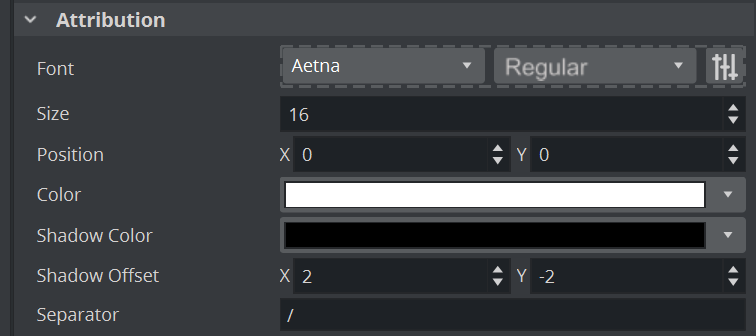
You can choose your font and style as well as the position to match your corporate identity.
There are certain limits, for example the font size must not be smaller than 16.
If the alpha is being changed to be a very low number, a fallback to the default font will happen.