The Configuration Service is the web-based control panel for a running VAM installation. You use it for everything except installing VAM in the first place: managing packages, changing platform settings, running backups and checking cluster health.
When to Use the Configuration Service vs. the Installer
Task | Use this |
|---|---|
First-time install of VAM |
|
Upgrade VAM to a new version |
|
Install / upgrade / uninstall a package | Configuration Service |
Change platform settings (cert, OIDC) | Configuration Service |
Take or restore a backup | Configuration Service. The installer only restores object-storage archives it made itself. |
Check pod / service health | Configuration Service |
Install the storage (AIStor) license | Configuration Service |
Order or issue VAM licenses | Neither. They are issued by Vizrt and held on the license server, see Prerequisites > Licensing. |
How to Open It
Browse to https://<vam-host>:30443/config. The exact URL was shown on the installer's Finish screen. For the gateway port and the load balancer case, see Prerequisites > Network.
Sign in with the OIDC identity provider you configured during installation. See Signing In.
You do not need access to the installer host to use the Configuration Service, because it runs inside the cluster and is reachable over the network like any other web app.
The Navigation Map
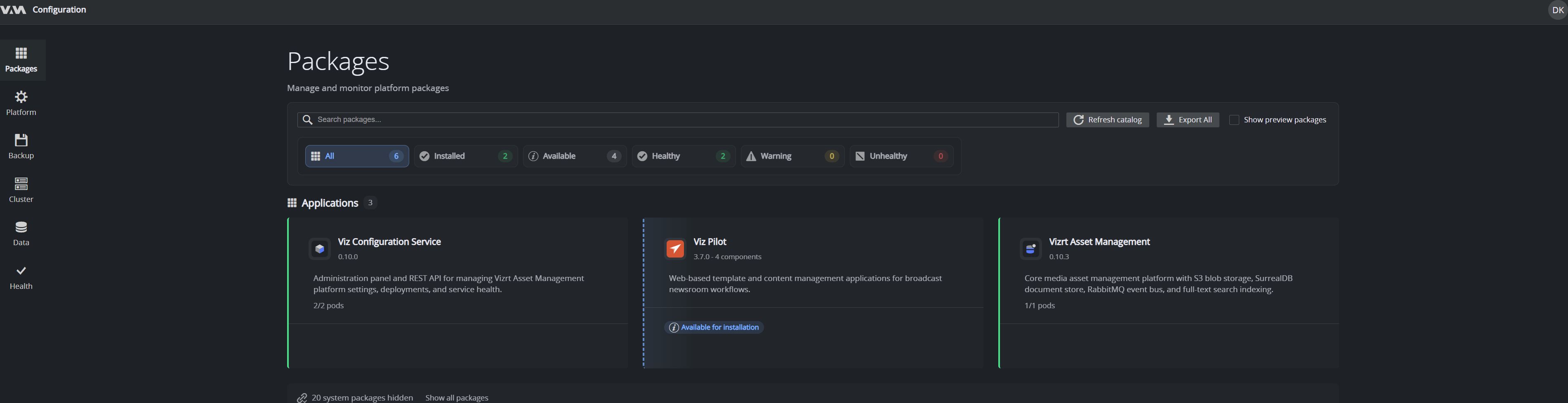
After sign-in, the left navigation has these sections:
Section | What it's for |
|---|---|
Packages | Browse, install, configure, upgrade and uninstall VAM packages. |
Platform | Authentication (OIDC), certificates (ADCS), networking, the container registry (Harbor), storage license, replication, advanced settings and the audit log. |
Backup | Run and schedule backups. Verify and restore them. |
Cluster | Read-only view of the underlying Kubernetes cluster: pods, workloads, services, events. |
Data | Trash recovery, index reconciliation and the retention and consistency settings of VAM. |
Health | On-demand health scan of the whole installation. |
About | The legal documents that govern this deployment, to view or download. |
Your account menu (the avatar in the top-right) is where you sign out.
The Packages view is the steady-state workspace: most day-to-day operation happens there.
Core Concept: Packages
Everything VAM installs is a package. The core asset-management services are packages, optional connectors and integrations are packages, and sample data is a package. The Configuration Service is shaped around this:
- The catalog shows packages available to install.
- The package detail page shows a single installed package: its current version, its configuration, its lifecycle actions (upgrade, reconfigure, uninstall) and its health.
This means that to configure VAM, or to upgrade a feature, you find the relevant package and operate on it. There is no separate settings surface for individual features.
Where to Go Next
- First time signing in: Signing In.
- Day-to-day operation: Managing Packages.
- After install: configure backups in Backup and Restore.