
Viz Mosart Administrator Guide
Version 4.0 | Published September 22, 2020 ©
AV Automation Devices Audio
Viz Mosart is capable of connecting a variety of Audio Mixers available from several different manufacturers.
Select the correct Audio Mixer from the menu for your broadcast environment. AV Automation handles the following:
-
Audio Mixer, a backup MIDI Audio Mixer.
-
Loudness Control from Junger.
Audio Mixer

-
Use Audio mixer: Enables the audio mixer functionality.
-
Audio mixer type:
Audio mixer
Protocol
Supported hardware
Interface
Calrec
RAP
RS-422, TCP/IP (Artemis)
DHD
DHD RM4200-D v2.02
TCP/IP
EUPHONIX
RAP
COM
LAWO RMNOPL
RemoteMNOPL
Lawo mc²
TCP/IP
LAWO ZIRKON
RAS, Lawo Zirkon subset
RS-422 or TCP/IP
MIDIMIXER
Sanford.Multimedia
MIDI
SSL
Light Broadcast Automation protocol, SSL Broadcast Automation Control Specification – v1.0
RS-422 or TCP/IP
STAGETEC
Stagetec Diamond RAS protocol, Monitora RAS
COM
STUDER_3000
Monitora + Ember, Ember 1.0
Studer OnAir 3000
RS-232 or TCP/IP
STUDER_VISTA
Ember
Studer Vista
TCP/IP
VIZENGINE
n/a
Viz Opus only
TCP/IP
WHEATSTONE
Wheatstone Mixer Automation Protocol v.1.4
TCP/IP
YAMAHA_O2
MIDI
Yamaha 01V96, DM1000, DM2000, DME64N, O2V96, LS9, CL5
MIDI
vizrt-ips
NewTek
Vizrt Group/NewTek ip series mixers. TriCaster, VMC, Viz Verdi, Viz Vectar
TCP/IP
-
-
Serial (Calrec, Lawo, Studer, etc.): Serial port connected to the audio mixer (when Serial radio button is selected).
-
TCP/IP: Hostname (or IP address) and port to communicate with the audio mixer (when TCP/IP radio button is selected).
-
Backup hostname and port (Lawo): Hostname (or IP address) and port to the backup audio mixer console.
-
Set user labels on console: When selected, user labels on the Lawo or Vista console are overwritten.
-
MidiCh (Yamaha): MIDI channel assigned to the audio mixer.
-
Midi Output port (Yamaha): System MIDI port to communicate with the audio mixer.
-
Default fade time: Time in frames for fading open faders with the manual fade function (CTRL+F).
-
Default snapshot: Snapshot to recall when starting the automation (MIDI parameter change).
-
Audio effect server: Name for the Audio effect fader. This fader will open if effect transitions are used.
-
Send reset command on connect: Used for STUDER3000 SW 2.2, or lower. Recalls a default setup for the Mixer panel.
-
Visible audio faders: Maximum visible faders in AV Automation.
-
Use sound player: Enables connection to the Audio Player.
-
Host: Hostname or IP address to the computer running the Audio Player.
-
Default directory: Directory for the audio files (on the Audio Player’s PC).
AV Automation Audio Mixer Compatibility Table
|
CAL REC |
DHD |
LAWO RMNOPL |
LAWO ZIR KON |
SSL |
STAG ETEC |
STUDER 3000 |
WheatStone |
YAMAHA O2 |
STUDER VISTA |
EUPHONIX |
vizrt-ips |
|
Serial |
x |
x |
x |
|
|
|
|
|
|
|
|
|
TCP/IP |
x |
x |
x |
|
|
|
|
|
|
|
x |
|
MidiCh |
x |
|
|
|
|
|
|
|
|
|
|
|
Midiport |
x |
|
|
|
|
|
|
|
|
|
|
|
Hostname |
x |
x |
x |
x |
x |
x |
x |
x |
x |
|
|
|
Port |
x |
x |
x |
x |
x |
x |
x |
x |
x |
x |
|
|
Backuphost name |
x |
|
|
|
|
|
|
|
|
|
|
|
BackupPort |
x |
|
|
|
|
|
|
|
|
|
|
|
Faderinputoffset |
x |
|
|
|
|
|
|
|
|
|
|
|
Useemberprotocol |
x |
|
|
|
|
|
|
|
|
|
|
|
Comportaudiomixer |
x |
x |
x |
x |
x |
x |
|
|
|
|
|
Loudness Control
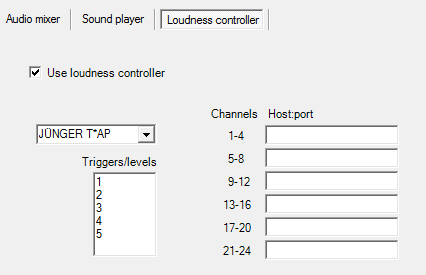
-
Use loudness controller: Check the box to enable loudness control.
-
Loudness controller type: JUNGER T*AP.
-
Triggers/levels: Name of triggers or loudness levels, one for each line. These will appear in a tool-tip menu in the Template editor, and must correspond to the configuration in the loudness controller(s).
-
Channels: Fixed values. For Junger T*AP there are four stereo channels per host. Connections to the audio faders are configured in A/V Setup/Edit/Audio config/Loudness channel.
-
Host:port: Hostname or IP address and optional port number for each controller.
See Also