
Viz Mosart Administrator Guide
Version 4.0 | Published September 22, 2020 ©
Control Commands in Templates
A Mosart control command can be triggered from a template, executed when the template is Taken, at Continue points or when the template is Taken out.
-
A DirectTake template is a special Mosart template designed for immediate execution, and is not normally part of a rundown.
-
A Mosart template can trigger multiple control commands.
-
A (not-templated) control command can trigger a Mosart template, often used for a DirectTake template.
Working with Control Commands
Controlling Video Servers
This is done via the Control Command page within the Template properties.
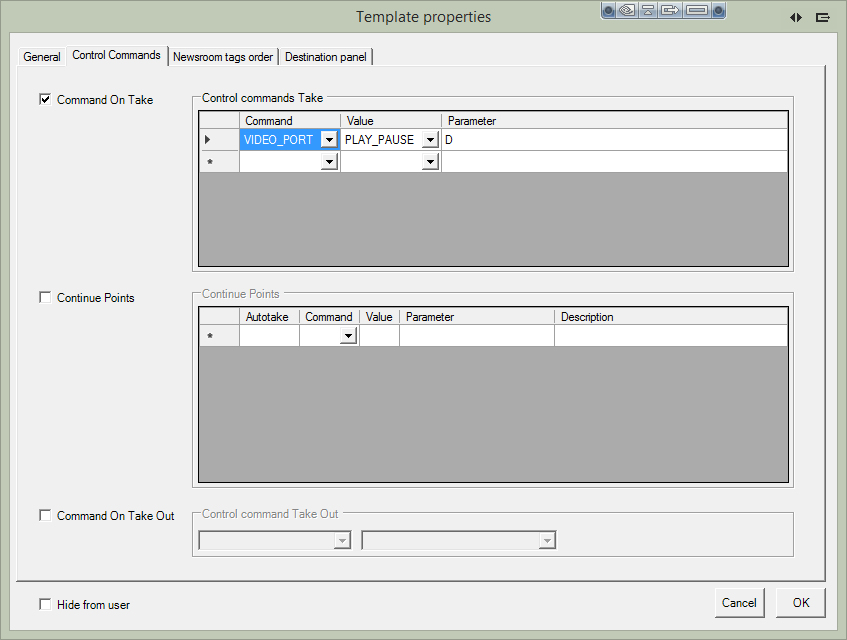
The figure above shows a single control command to be executed when the template is taken. Multiple control commands can be assigned here.
It is also possible to assign control commands to be executed at continue points and when the template is taken out.
The latter has limitation since the Parameter attribute is not available. In this context it may be useful to trigger a DirectTake at this place.
Adding a Control Command
To Add a Control Command
-
Click the Control Commands tab in the Template properties window.
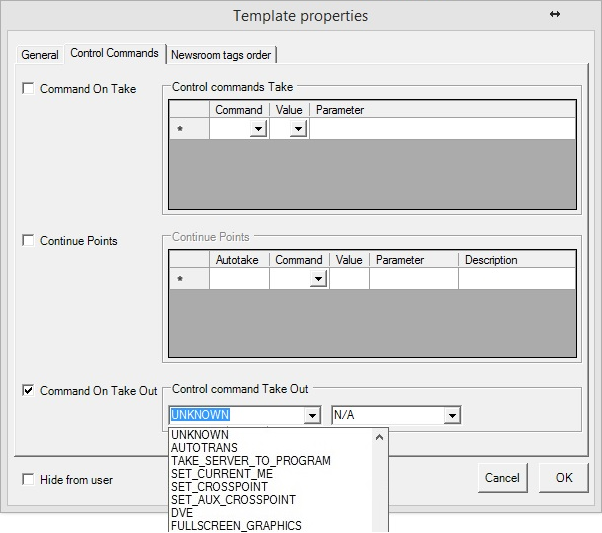
The three categories of control command are Command On Take, Continue Points and Command on Take Out. -
Refer to the table Command Values and Parameters for command details.
Command On Take
When selected, the commands inserted in Control commands Take are executed when the template is taken to Program or On Air.
By setting a Newsroom tag as a parameter in the OnTake-commands, the user can set the parameter from the NCS. When the user is using the ActiveX to add a template to the rundown, a text box is visible, requesting this value.
Continue Points
When selected, the commands inserted in Continue Points will be taken when pressing TAKE NEXT (default: F12). Viz Mosart executes this continue point from within the primary template in which it is inserted. Each line represents a new Continue Point.
-
Cue Next Item Index: Enter the line number (for example, 0, 1, 2, 3) of the continue point that executes a cue for the next/following Primary object. If empty, Viz Mosart cues when entering the last continue point in the list.
-
Autotake: Insert the autotake time, in frames. The control command continue-point is then automatically taken after that time.
Command on Take Out
The commands inserted here are executed when the template is taken from the program, taken Off Air, or at the end of the template. Only a single command can be used in Command On Take Out, and it does accept any parameters.
Command Values and Parameters
Note: Parameters marked with (*) do not work for templates.
Note: It is not possible to enter a Parameter in the Control command Take Out section.
|
COMMAND |
Value |
Parameter |
Description |
||||||
|
UNKNOWN |
N/A |
|
Default fallback. Does nothing. |
||||||
|
AUTOTRANS |
PP, ME1, ME2, ME3, ME4 |
MixEffect (MIX OR WIPE) + Transitionrate |
For example: MIX 33, WIPE 10. Note: The Effect cannot be used. |
||||||
|
|
AUX, Default |
(*) |
|
||||||
|
TAKE_SERVER_TO_PROGRAM |
N/A |
transRate (integer) - parameter. (*) |
Takes a video server port to program on a selected ME. For example: a video clip is running on a video wall. |
||||||
|
SET_CURRENT_ME |
PP, ME1, ME2, ME3, ME4 AUX Default |
(*) |
|
||||||
|
SET_CROSSPOINT |
N/A |
(*) |
|
||||||
|
SET_AUX_CROSSPOINT |
N/A |
(*) |
|
||||||
|
DVE |
FORWARD REVERSE |
Recall forward/revers emem |
n/a |
||||||
|
FULLSCREEN_GRAPHICS |
CONTINUE_FULLSCREEN |
AUTO |
Continue Command Only: The AUTO parameter will replace the continue command with the number of continue points in the graphics item. Examples: |
||||||
|
FULLSCREEN_GRAPHICS |
CONTINUE_FULLSCREEN |
Engine no |
The target output fullscreen engine number to execute the action on. (e.g. 1,2,3 ) |
||||||
|
|
MACRO |
Engine no : macro |
The target output fullscreen engine number to execute the action on. (e.g. 1,2,3 ) and Macro name. The engine number must be same as the number defined in AV Automation |
||||||
|
OVERLAY_GRAPHICS |
CLEAR |
Destination or Render (Engine no.) |
Destination or Render (Engine no.) to clear the graphics from. Numerical value: Render (Engine no.) Non-numerical value: Destination. |
||||||
|
|
CONTINUE |
Engine no |
|
||||||
|
|
TAKE_MANUAL_OUT |
Destination or Empty |
Destination to take out the graphics from. Non-numerical value: Destination Empty or Numerical value: Takes out all the graphics |
||||||
|
|
MACRO |
Engine no : macro |
For example: 4:macrohere |
||||||
|
|
PRETAKE_NEXT_OVERLAY |
Render (engine no) |
|
||||||
|
|
TAKE_NEXT_OVERLAY, TAKE_NAMED_OVERLAY |
(*) |
|
||||||
|
OVERLAY_TO_MANUAL |
Parameter 1: ONAIR (default), PREVIEW. |
Parameter 2: Comma-separated list of handler names Parameter 3: AUTOMATIC (default) / MANUAL Parameter 2 and Parameter 3 must be separated by a semicolon. (E.g. WALL,DSK;MANUAL.) |
For more details, see Control Command Key OVERLAY_TO_MANUAL ) Note: If there is no semicolon after Parameter 2; nothing to the right of the semicolon; or Parameter 3 has any value other than 'MANUAL', then Parameter 3 gets the default value ‘AUTOMATIC’. |
||||||
|
WEATHER |
N/A |
(*) |
|
||||||
|
AUDIO |
FADE_MANUAL |
|
Toggle fade manual |
||||||
|
|
FADE_OUT_KEEPS, FADE_DOWN SECONDARY_AUDIO, FADE_UP SECONDARY_AUDIO |
Fader rate |
|
||||||
|
|
SET_LEVEL_2_ONAIR, SET_LEVEL_2_PREVIEW, FREEZE_AUDIO |
- |
|
||||||
|
DIRECTTAKE |
# |
- |
Uses the value selected in the drop-down |
||||||
|
LIGHT |
N/A |
(*) |
|
||||||
|
AUTOTAKE |
N/A |
(*) |
|
||||||
|
PLAY_STORY |
N/A |
(*) |
|
||||||
|
STUDIOSETTUP |
# |
- |
|
||||||
|
VIDEOWALLMODE |
N/A |
(*) |
|
||||||
|
GRAPHICSPROFILE |
N/A |
- |
|
||||||
|
SEQUENCE |
LOOP |
- |
Sets a running sequence to start looping |
||||||
|
|
STOP_LOOP |
- |
Stops running a looped sequence in loop |
||||||
|
|
STOP |
- |
Stops a running sequence |
||||||
|
|
START |
- |
Restarts a previously stopped sequence |
||||||
|
MARKER |
N/A |
(*) |
|
||||||
|
VIDEO_SERVER_GOTO |
N/A |
(*) |
|
||||||
|
TRANSITION_TYPE |
CUT, MIX |
Rate |
|
||||||
|
|
EFFECT |
Effect no |
|
||||||
|
|
TOGGLE |
(*) |
|
||||||
|
RECORD |
PREPARE, START, STOP |
Split parameters using, - first: clipname, - second: recorder (optional), - third: port name (default Rec), - fourth: group name (default Rec) |
For example: clip33,recorder1,Rec,Rec |
||||||
|
DEVICE_PROPERTY |
CAMERA CONTROL |
See next column. |
Note: This is for camera robotics. The 'DEVICE_PROPERTY' control command with value 'CAMERA CONTROL' is only used as a way to set speed (Camerobot) and presenter (Camerobot/FxMotion) from a template. Details for Camerobot Presenter: ANCHOR=pos1:presenter1[,pos2:presenter2]… The position and presenter is given as a pair divided by ‘:’. Multiple position-presenter pairs are possible, separated by ‘,’. Examples:
|
||||||
|
|
AUDIO |
demands <fields> structure as parameter with parameter1=AUDIO, parmeter2=key, parameter3=value OR connectionstring style |
Note: This is for an audio mixer. |
||||||
|
CROSSOVERCOMMAND |
N/A |
(*) |
|
||||||
|
ACCESSORIES |
TAKE_NEXT |
(*) |
|
||||||
|
SET_VIDEOSERVER_SALVO |
N/A |
(*) |
Not implemented for templates |
||||||
|
SWITCH_VIDEOSERVER_MIRRORING |
N/A |
(*) |
Not implemented for templates |
||||||
|
SWITCH_GRAPHICS_MIRRORING |
TOGGLE, ACTIVATE, DE-ACTIVATE |
- |
|
||||||
|
ENABLE_GRAPHICS_MIRRORING |
N/A |
(*) |
|
||||||
|
HOLD_VIDEO_TRANSITION |
N/A |
- |
|
||||||
|
HOLD_AUDIO_TRANSITION |
N/A |
- |
|
||||||
|
NCS |
START_STATUS, STOP_STATUS |
RUNDOWN STORY ITEM |
Specific for Open Media |
||||||
|
TAKE_CONTINUE_POINT |
N/A |
(*) |
|
||||||
|
RUNDOWN_NCS_RESYNC |
N/A |
(*) |
|
||||||
|
RELEASE_BACKGROUND |
N/A |
(*) |
|
||||||
|
VIDEO_PORT |
N/A |
Must be a comma separated list in the format: command,port,parameter |
For example: PLAY_PAUSE,A,PLAY. Refer to the section Video Port Control Commands in the Viz Mosart User Guide. |
Parameters with Placeholders
Control command parameters can include placeholders which are then populated with values found among the fields of a currently On Air, Viz Mosart item. A placeholder is defined as a string of characters, within curly brackets {placeholder}.
For example, a placeholder can be useful for transmitting values from the NCS, for use as control commands that will be executed when the template is taken On Air.
Example: Providing the clip name to be recorded from NCS.
In NCS, a column can be created for giving the name of the clip to be recorded with Viz Mosart. Then, in Viz Mosart Newsroom settings, map the column in Story External Metadata as follows:
<mostag mostagname="NCScolumn" mosart_action="item_variable" action_value="NCS_filename" format_type="String" />In Manus file, the Mosart item will have the following fields (the value Clip1 is given from NCS):
<fields> <field name="NCS_filename" value="Clip1" /></fields>Then, in Template Editor, the control command for the respective template is configured as follows:
RECORD PREPARE {NCS_filename}_Test,Recorder,RecPortWhen the template is executed, a clip with name Clip1_Test is prepared for recording.